Example - Trainer Aircraft
A complete CCPE avionics example: a flyable fixed-wing trainer aircraft that integrates the Sensor System (static port / pitot tube / INS / FMC), the Modular Monitor (switch / knob / screen), the Control Desk (joystick / pedal / throttle) and Aero Bearing control surfaces — with pitch damping, auto-roll, auto-throttle and altitude hold.
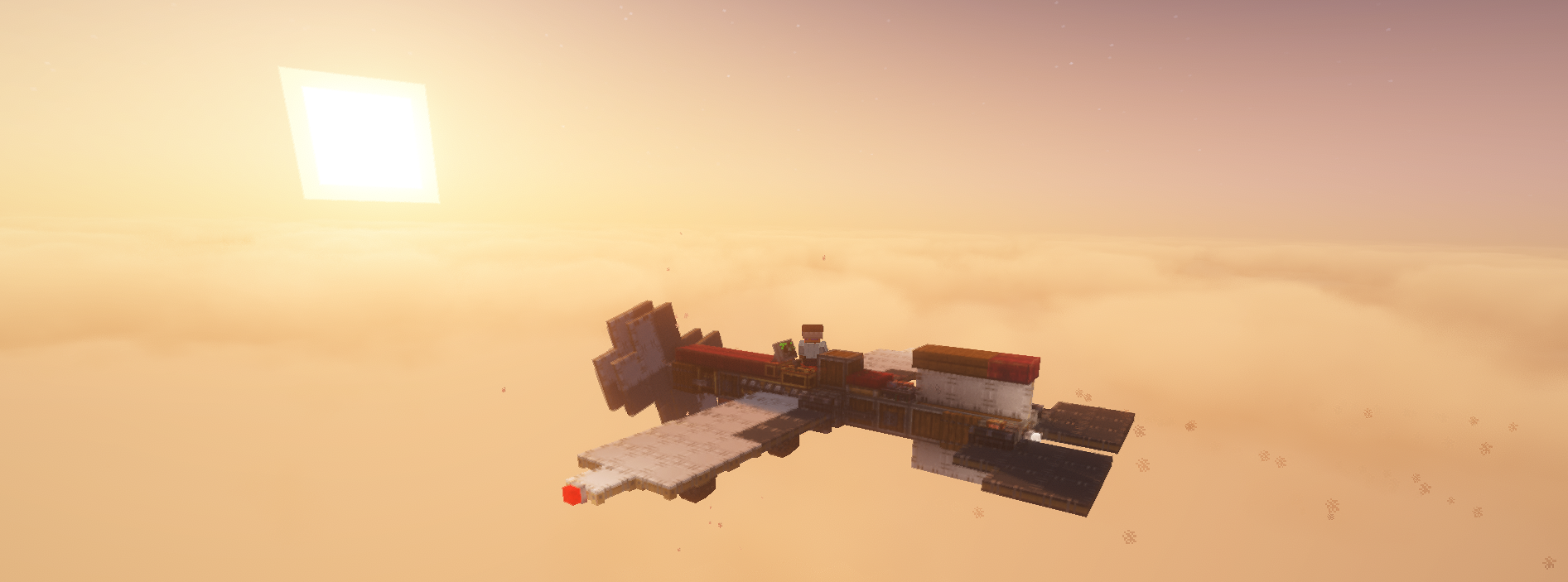
> Download Save <
Note
Version 1.1.4 changed the weight of the fluid port, so you need to manually rebalance the aircraft.
Required Mods
- CC:Tweaked
- Create
- Sable
- Create: Aeronautics
- Create: Diesel Generators
- CCPE (this mod)
Comes with its own control program: trainer aircraft\computercraft\computer\0\startup.lua (included in the save, runs automatically on boot).
Design Overview
Everything about this trainer is built around simplification:
- Simplified drive — the fuselage is one long stick, transferring stress in a straight line.
- Simplified aero — trimmed so the thrust line passes through the center of mass and the lift center coincides with it — throttle changes produce no pitch moment and level-flight net moment ≈ 0, keeping the control logic simple and predictable (see the Flight Management Computer for the game's aero model).
- Simplified controls — only elevator (pitch) and ailerons (roll) as control surfaces, no rudder — yaw comes from differential thrust / sideslip, so Lua only needs to control two axes.
Control Panel
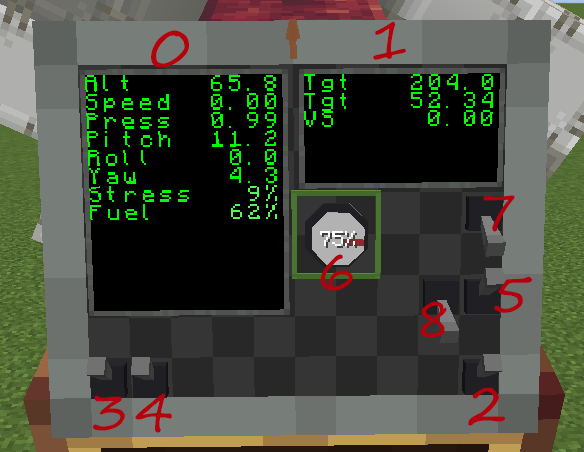
Monitor module IDs for each control (used with monitor.getModule(id) in Lua):
| Control | Module ID | Description |
|---|---|---|
| Screen (left) | 0 | Main flight data display |
| Screen (right) | 1 | Altitude-hold data display |
| Engine switch | 2 | Engine on / off |
| Screen switch | 3 | Show / hide screens |
| Navigation light switch | 4 | Three-color navigation lights |
| Auto-roll switch | 5 | Wings-level hold when hands off (PD) |
| Altitude knob | 6 | Target altitude (see below) |
| Auto-throttle switch | 7 | Airspeed hold + altitude hold |
| Pitch-damping switch | 8 | Artificial pitch damping (suppresses phugoid) |
Screen Display
Left screen (module ID 0), top to bottom:
- Alt: current altitude (m)
- Speed: current speed (m/s)
- Press: current pressure
- Pitch: pitch angle (°) — screen shows nose-up as positive (opposite sign of the raw API reading)
- Roll: roll angle (°)
- Yaw: yaw angle (°)
- Stress: stress used, percent
- Fuel: fuel remaining, percent
Right screen (module ID 1), top to bottom:
- Tgt: target altitude (set by the altitude knob)
- Tgt: airspeed needed to hold that altitude (solved from "lift = gravity")
- VS: vertical speed (m/s, positive = climbing)
Flight Operations
- Hold a Diesel Generators fuel bucket, right-click the fluid port between the landing gear to fill the aircraft with fuel
- Sit on the seat
- Flip the engine switch on
- Hold Space to push the throttle to gear 1 for slow taxiing (hold Ctrl to reduce throttle)
- Press Q or E to work the pedals, steering the nose wheel to taxi onto a suitable taxiway
- Hold Space to push the throttle to full and take off
- Around 300 m, tap W to keep from climbing too high
- Turn the altitude knob (aim at the knob, hold right mouse button and move the mouse around it) to set the target altitude (0% ≈ 70 m, 100% ≈ the aircraft's maximum steady-state altitude at max RPM, about 250 m)
- Flip the auto-throttle switch on — the aircraft automatically controls the throttle and holds the target altitude
Wings-level helper
Turn on the auto-roll switch to level the wings whenever you let go of the stick. It never fights manual control — any joystick X-axis input automatically switches auto-roll off.
Autopilot Functions (startup.lua)
Artificial Pitch Damping
Feeds the pitch rate back into the elevator command (PITCH_DAMP_GAIN = 0.5) to suppress the long-period pitch oscillation (phugoid).
Auto-Roll
With hands off the stick and roll outside the deadband, drives the ailerons from "roll angle proportional + roll-rate damping" (ROLL_KP = -0.5, ROLL_KD = -0.5) to level the aircraft.
Auto-Throttle + Altitude Hold
A three-step closed loop:
- RPM feedforward — target altitude → required pressure → required airspeed from "lift = gravity" → propeller RPM from lift-surface drag + universal drag (
getPropellerRPM, θ = 90°). - Airspeed PI correction — corrects the throttle from the pitot airspeed error (
AIRSPEED_KP = 0.002,AIRSPEED_KI = 0.001), eliminating model / wind / mass drift. - Altitude hold — outer loop altitude error → target vertical speed (
ALT_HOLD_KP_VS = 0.3, clamped ±5 m/s), inner loop vertical-speed error → elevator (ALT_HOLD_KP_PITCH = 1.0, clamped ±15°).
Flight Tips
- Hands-off full throttle at low altitude pitches up by itself: lift ∝ pressure × airspeed — at low altitude pressure is high, so the same airspeed produces excess lift → climb; at high altitude pressure is low, so more airspeed is needed for lift. For stable cruise use the altitude knob + auto-throttle; when flying manually, pull the throttle back a bit low and go full throttle high.
- Long-period oscillation (phugoid): after letting go, the aircraft slowly bobs up and down at ~16 s per cycle — normal aero behaviour (static-stability recovery + inertia overshoot); pitch damping settles it.
- Control-surface chatter: if the elevator / ailerons chatter at high frequency, lower
PITCH_DAMP_GAINbelow 0.5, or reduceALT_HOLD_KP_PITCH/ALT_HOLD_KP_VS.
Related Pages
- Sensor System — static port / pitot tube / INS / FMC / AIC
- Aero Bearing — Lua-control control surfaces
- Modular Monitor — switch / knob / screen modules
- Control Desk — joystick / pedal / throttle