Engine Core
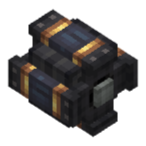
The Engine Core (ccpe:engine_core) is the skeleton of the engine system — a Create kinetic power-source block that assembles into a multi-block row. Cores placed in a line merge into one engine (1×1×N, up to 21 blocks) that shares a single running state, temperature and throttle; only the controller (one end of the row) outputs stress and makes decisions.
Assembly & placement
- Place the first core, then right-click an existing engine with another engine core to extend it along its axis (Create
PoleHelperplacement). The cores auto-merge into one multi-block engine. - Engines are persisted: after a chunk reload, the cores re-assemble via their saved positions (
Uninitialized/LastKnownPosNBT, also works with Create schematics). - The engine state (temperature, throttle, mixture, economy progress) is inherited when you extend the engine — extending at the controller end keeps the running state instead of resetting it.
- Controller: the block at one end of the row. Only the controller ticks, generates stress and runs the Lua peripheral. A non-controller core reports 0 generated speed, but every core is a valid place to read/write the engine from Lua (the peripheral delegates to the controller).
Power output — fixed-pitch propeller, one lever
The engine follows a fixed-pitch propeller model: the throttle lever is the only power lever, and it scales stress and speed together.
- Speed = throttle × 256 rpm (0~256, linear). Default throttle: 0.25 (64 rpm).
- Stress capacity = running chambers × base SU × fuel stress multiplier × throttle (fluid chamber 8192 SU, steam chamber 4096 SU).
- Because stress and speed scale together, the overload ratio never changes with throttle — and an external speed controller cannot cheat the engine (power budget = stress × speed always scales with the throttle).
Operating conditions
The engine outputs stress only while it runs:
- ≥ 1 running chamber (has fuel to burn),
- throttle > 0 (throttle 0 = stopped, no fuel burned),
- not overheated (fluid engines only; T ≥ 220°C hard-stops, resumes at ≤ 200°C hysteresis),
- steam engines: T ≥ 100°C and water available (warm-up below 100°C burns without generating),
- overload does not stop the engine — like Create generators, it keeps running and burning fuel, and the goggles show a red "Network overloaded" warning.
Goggle display
Hover any engine core with Create goggles (the tooltip is delegated to the controller):
Engine Status
Temperature: XX.X°C
Stress Output: 8192 SU
Current Speed: 128 RPM
Modules:
- Fluid Combustion Chamber x1
- Cooling Air Duct x1
The Stress Output line shows the total stress the engine currently produces (server-synced), Current Speed is throttle × 256, and the module list shows which chambers/ducts are attached.
Lua control
The engine is controlled exclusively from Lua (no redstone). Wrap any core segment as a CC:T peripheral — the peripheral lives on the controller and non-controller segments delegate to it:
local e = peripheral.wrap("front")
print(e.getTemperature())  -- temperature in °C
e.setThrottle(0.5)         -- 50% throttle = half stress + 128 rpm
See the Lua API page for the full method reference.