Monitor 2
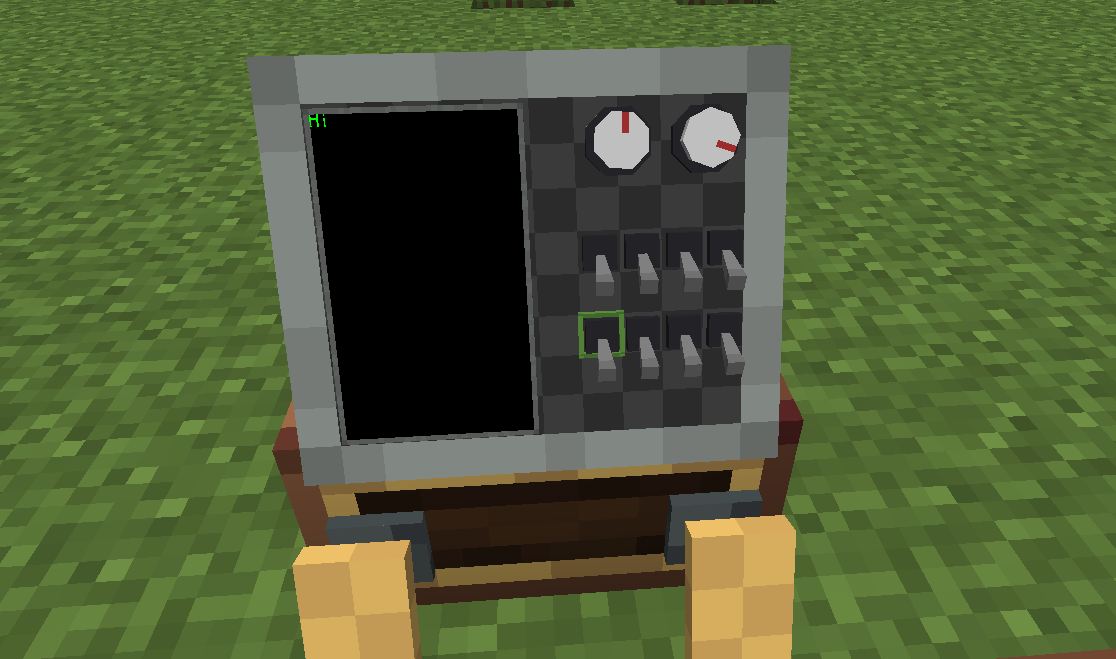
Monitor 2 installs onto the top of a Control Desk as a built-in mini Monitor: its screen face is a 10×8 grid of module slots holding the same modules as the full Monitor — buttons, toggle switches, knobs and screens — all freely controlled via Lua.
It occupies the full 14×6 desk-top grid — the only legal placement is center
(8,12)— so it is mutually exclusive with the Throttle and Throttle 2 (only one of them can be installed at a time). Unlike those controls, Monitor 2 does not face the player: it only rotates with the desk's facing.
Installing / Removing
- Install: hold the Monitor 2 item and right-click the desk. It mounts at the only legal position (center
(8,12)) of the desk-top grid; a 14×6×12 preview box shows where it will go (green = free, red = occupied). - Remove: sneak + right-click with a Create wrench to remove it; breaking the desk drops it as an item.
The 10×8 Grid
The screen face is a 10×8 grid (the full Monitor is 12×10): x 0..9, y 0..7. Module placement, interaction, rendering and configuration are identical to the Monitor — see Monitor Overview.
| Type | Description | Docs |
|---|---|---|
button_1 |
Button (momentary; player click / interaction lock / light strip) | Button Module |
toggle_switch |
Toggle switch (latching) | Switch Module |
knob |
Knob (angle 0..360) | Knob Module |
screen |
Screen (cell-model text + free-position graphics) | Screen Module |
Lua API
Monitor 2's Lua API is identical to the Monitor's — there is nothing new to learn. Only the grid size differs (10×8 vs 12×10).
Getting the Monitor 2 Peripheral
Get it from the control desk peripheral via getModule("monitor") (peripheral type "ccpe:monitor_2"); returns nil when Monitor 2 is not installed:
local ss = require("ccpe.sensor_system")
local desk = ss.getPeripheral(4)
local m = desk.getModule("monitor")   -- nil if no Monitor 2 installed
m has the same methods as a Monitor peripheral — getCellModule(x, y) / getModule(id) / playNiceSound() / playSound(name) — fully described in Monitor. Here all queries operate on the 10×8 grid.
Shortcuts (no intermediate peripheral needed)
The desk peripheral also exposes the same queries directly on the 10×8 grid:
| Method | Description |
|---|---|
desk.getMonitor2CellModule(x, y) |
Module/screen on the cell (x 0..9, y 0..7); nil if empty / Monitor 2 not installed |
desk.getMonitor2Module(id) |
Module/screen by ID; nil if not found / Monitor 2 not installed |
Module Instances
The returned module/screen instances are the same handles as the Monitor's — common methods (getId(), getType(), getX(), getY(), getWidth(), getHeight(), setTooltip()) and each type's own methods are described in the Monitor docs:
- Common instance methods — Monitor Overview → Common Module Instance Methods
- Per type — Button / Switch / Knob / Screen
Differences from the Monitor
Only the grid size differs (10×8 vs 12×10). Everything else behaves identically, including the mainThread rules and nil semantics.
Example
local ss = require("ccpe.sensor_system")
local desk = ss.getPeripheral(4)

-- Read a module directly from the 10×8 grid
local mod = desk.getMonitor2CellModule(3, 4)
if mod then
    print("type:", mod.getType(), "id:", mod.getId())
    mod.setTooltip("Pressure gauge")
end

-- Or go through the Monitor 2 peripheral
local m = desk.getModule("monitor")
if m then
    local scr = m.getCellModule(1, 1)
    if scr and scr.getType() == "screen" then
        scr.write("Hello from Monitor 2")
    end
end