Throttle
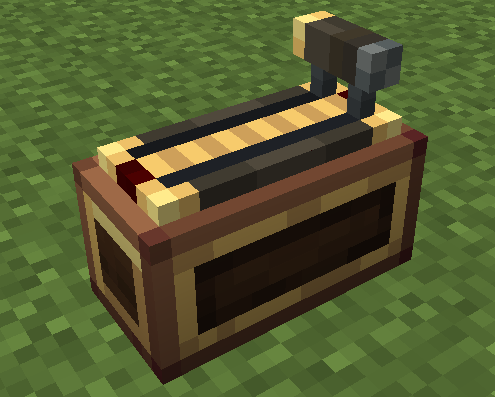
The Throttle installs onto a Control Desk and shifts through 12 discrete gears (0..11). The handle slides along the model-space X axis: gear 0 is at the bottom (−X end), gear 11 is full forward (+X end), 1 px per gear. Hold the forward key (default Space) to shift up, hold the back key (default Left Ctrl) to shift down.
The Throttle occupies the full 14×6 desk-top grid — the only legal placement is center
(8,12)with 0°/180° rotation only — so it is mutually exclusive with Throttle 2 and Monitor 2 (only one of them can be installed at a time).
Gear Shifting
- Gear shift rate (ticks): how long you must hold a key to shift one gear — default 4, range 1..100 (20 ticks = 1 second). Holding continuously shifts one gear every N ticks.
- The throttle locks in place — there is no auto-return. Releasing the keys (or pressing both) holds the current gear; the gear also persists after you leave the seat, like a physical throttle.
- Each gear shift plays a lever click whose pitch rises with the gear position (forward shifts go low → high, back shifts go high → low, 0.75 → 1.5); the lowest gear (0) does not click.
- The indicator light colors from dark red (gear 0) to bright red (full forward) as the gear rises.
Key Bindings
| Action | Default key |
|---|---|
| Forward (shift up) | Space |
| Back (shift down) | Left Ctrl |
Both bindings and the gear shift rate are configurable per-desk in the module settings menu (open the desk config menu and click the "Throttle" row).
Free Mode
By default the throttle is in gear mode — it notches into 12 discrete gears and clicks on each shift. Switching to free mode makes the handle slide smoothly and continuously: the position is a continuous value 0..1 that can stop anywhere between gears, and it still latches in place when you release the keys (no auto-return).
- Free mode has no GUI — it is controlled entirely from Lua (
setFreeMode, see Lua API). - While in free mode, holding a key moves the handle by
1/ratepx per tick, whererateis the gear-shift-rate setting — a full travel (11 px) takes11 × rateticks. - The lever click still plays once every 1 px the handle travels (each time it crosses a gear mark), with the pitch rising with the position — the bottom mark (0) does not click, just like gear mode.
- Switching back to gear mode snaps the position to the nearest gear.
- The mode is persisted with the desk (saved in the world, kept in Create schematics).
local th = desk.getModule("throttle")
print(th.isFreeMode())   -- false by default (gear mode)
th.setFreeMode(true)     -- switch to free mode (no notches)
th.setAxis(0.37)         -- move the handle to 37%
Lua API
local ss = require("ccpe.sensor_system")
local desk = ss.getPeripheral(4)
local th = desk.getModule("throttle")   -- nil if no throttle installed
th.isForwardActive() / th.isBackActive()
Returns true while the forward / back key is held (raw input, reads the server input lease).
th.getThrottleGear()
Returns the current gear as an integer (0..11): 0 = lowest (bottom, −X end), 11 = full forward (+X end). The gear latches — it does not return to 0 on its own.
th.isActive()
Returns true while someone is operating this throttle (either the forward or the back key is held — reads the server input lease).
th.getAxis()
Returns the normalized throttle position (number, 0..1) = position / max travel: 0 = bottom, 1 = full forward. In gear mode this is a discrete value (gear / max); in free mode it is continuous (can stop between gears).
th.isFreeMode()
Returns true when the throttle is in free mode, false when in gear mode (default). The mode has no GUI — it is switched from Lua and persisted (survives saving and Create schematics).
th.setFreeMode(enabled)
Switches between free mode (true) and gear mode (false).
true(free travel): holding forward/back moves the handle smoothly and continuously, playing a lever click each time it crosses a 1 px (one gear) mark, and latching on release.false(gear, default): holding a key charges for the gear-shift rate then shifts one gear, with a lever click per shift.
Switching back to gear mode snaps the position to the nearest gear.
th.setAxis(axis)
Directly sets the throttle position (axis in 0..1, out-of-range values are clamped): written continuously in free mode, snapped to the nearest gear in gear mode.
Note: while a player is operating the desk from a seat (the input lease is active), the server simulation advances the position every tick and overrides this call. With no player input the setting holds until the next key press or mode switch.
Threading
All state-reading methods (isForwardActive(), isBackActive(), isActive(), getThrottleGear(), getAxis(), isFreeMode()) run on the CC worker thread (mainThread = false) and are safe to poll at high frequency. The control methods (setFreeMode(), setAxis()) run on the server main thread (mainThread = true).