Dock
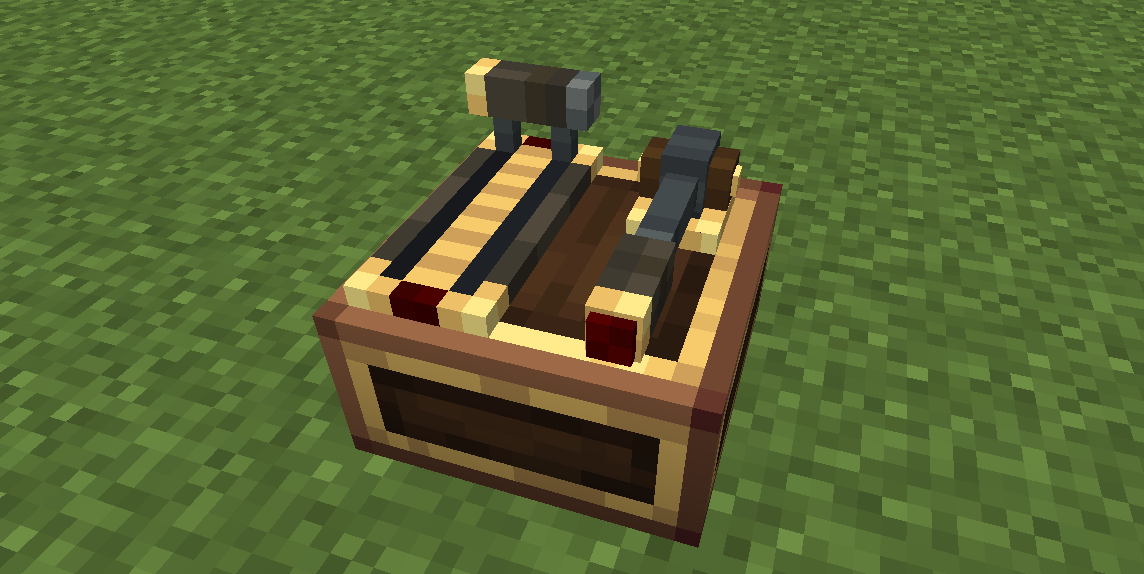
The Dock is a desk form conversion, not a separate control. It turns a Control Desk into a full-width slab desk.
Install: hold the Control Desk (the desk you place in the world) and right-click an already-placed desk. The top grid expands from 6×14 to 14×14.
Effects
- Tabletop extends over the front area (
z0..8), the desk becomes a full 16×8×16 slab. - Top grid expands to 14×14 (
x1..15 / z1..15): Throttle, Throttle 2 and Monitor 2 can now be placed at any z between the new bounds, and Joystick 2 gets a much larger placement area. - The desk keeps everything else (channel, seat operation mode, CC peripheral) — only the shape changes.
Conflicts
- The dock conflicts with Foot Pedals and the Joystick (they mount on the front area the dock covers). Install the dock before mounting pedals/joystick; to install one later you must remove the dock first.
- The dock is mutually exclusive with the Baffle (both are form conversions) — only one form can be active.
Removal
Hold a Create wrench and sneak + right-click the desk's front area.
Remove modules on the extension first
Any top modules placed in the area added by the dock (the front rows the dock created, north of the normal 6×14 grid) must be removed before the dock can be removed — otherwise those modules would be left hanging over the edge. Move or remove them first, then the dock can be taken off. The desk's base form is restored and a desk item is dropped.