监视器概述

模块化监视器(Monitor)是 CCPE 的互动信息终端:一块 12×10 的棋盘式插槽面板,可以在格子上安装按钮、开关、旋钮、屏幕等模块,并通过 CC:T 计算机用 Lua 自由控制它们。
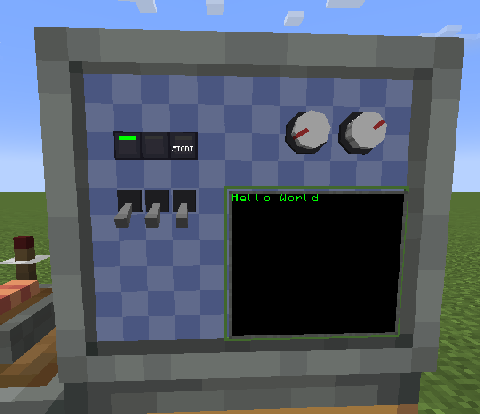
获取 Monitor 外设
Monitor 的 CC:T 外设类型名是 "ccpe:monitor",获取方式有两种:
方式 A:通过频道获取(推荐,跨距离)
借助外设扩展器的频道系统,在任意距离拿到 Monitor 外设:
方式 B:cc:t 外设
计算机紧贴 Monitor 放置时直接 wrap:
monitor 本身提供模块/屏幕的查询方法与音效方法(见 监视器)。查到的「模块实例」再提供各自的 get/set 方法。
模块类型
| 类型名 | 说明 | 文档 |
|---|---|---|
button_1 |
按钮(瞬时型;支持玩家点击检测 / 互动锁 / 灯带控制) | 按钮模块 |
toggle_switch |
钮子开关(锁存型) | 开关模块 |
knob |
旋钮(角度 0..360) | 旋钮模块 |
screen |
屏幕(格子模型文本渲染 + 自由定位图形) | 屏幕模块 |
模块实例通用方法
以下方法对所有模块类型(button_1 / toggle_switch / knob)以及屏幕(screen)都可用(handle 表示任意模块实例)。
| 方法 | 说明 |
|---|---|
handle.getId() |
返回该模块/屏幕在本 Monitor 内的唯一 ID(数字) |
handle.getType() |
返回类型名字符串:"button_1"、"toggle_switch"、"knob" 或 "screen" |
handle.getX() / handle.getY() |
返回模块/屏幕左上角所在格子的坐标(数字) |
handle.getWidth() / handle.getHeight() |
返回占用尺寸(格数,数字)。例如旋钮(knob)为 2×2 |
handle.setTooltip(text) |
设置该模块在配置界面/悬停时显示的 tooltip 文本(屏幕写入悬停说明文字 tooltipText) |
print(mod.getId(), mod.getType())   -- 7  toggle_switch
mod.setTooltip("喂料阀门")
screen.setTooltip("压力表")
约定与说明
- mainThread 规则:所有纯 get 方法
mainThread = false(计算机线程直接读,低延迟);所有 set / 动作 方法mainThread = true(服务器主线程写,安全)。注意wasClicked()/clearClicked()属于「读取并清除」,也算动作,走mainThread = true。 - 格子坐标:
x0..11,y0..9(12×10 网格)。 - 模块 ID:同一 Monitor 内唯一,模块与屏幕共用命名空间。
- 返回 nil:查询不到(空格 / 无效 ID)时返回
nil。
完整示例
local pe = require("ccpe.pe")
local monitor = pe.getPeripheral(3)

-- 遍历一个格子上的模块
local mod = monitor.getCellModule(3, 4)
if mod then
    print("type:", mod.getType(), "id:", mod.getId())
    mod.setTooltip("由 Lua 设置的说明")

    if mod.getType() == "toggle_switch" then
        mod.setToggleState(true)
    elseif mod.getType() == "knob" then
        mod.setAngle(135)
    elseif mod.getType() == "button_1" then
        mod.press()
    end
end